Cache Rules config
Cloudflare Application Performance features optimize how your content is delivered, reducing latency for users and decreasing load on your origin servers. By leveraging Cloudflare’s global network, you can ensure faster, more reliable application performance worldwide.
Cache Rules: Smart Caching at the Edge
Task
Verify CDN Configuration parameters & modify cache behavior with Cache rules . The aim of this task is to serve a page (including html, which is not cached by default) from cache. We will use /product/generic-mouse-and-keyboard/ in this example.
Cloudflare caches several different extensions by default unless your origin tells us not to (for example, with a cache-control header with a value of private). Here is a link to default cache behaviour of Cloudflare.
Note that HTML is not cached by default. Sometimes it’s desirable to override the default cache behavior to serve more from cache.
Why
- Accelerate content delivery by serving data from 300+ global edge locations, reducing origin load and latency while cutting bandwidth costs
- Control caching behavior precisely through Cache Rules - customize TTLs, cache keys, and origin response settings without writing code
- Serve stale content during origin errors with customizable grace periods, ensuring high availability even if backend systems fail
Configuration Steps:
ℹ️ While the majority of examples are using curl, we do also provide Browser and Powershell examples. Please feel free to repurpose and reuse for the later steps if you prefer these tools.
1. Analyze default behaviors:
Using curl or your browser, let’s check the HTTP response headers (remember to replace <slug> with your own zone):
- curl
- Browser
$ curl -I "https://<slug>.sxplab.com/product/generic-mouse-and-keyboard/"
Example output
< HTTP/2 200
< date: Mon, 25 Aug 2025 06:55:10 GMT
< content-type: text/html; charset=UTF-8
< cf-ray: 97492ea97d40e4fc-JHB
< cf-cache-status: DYNAMIC
< SameSite=None
< server: cloudflare
< server-timing: cfReqDur;dur=216.331
Open a new tab in your web browser and open Developer Tools (typically this can be accessed by pressing F12).
Browse to your https://<slug>.sxplab.com/product/generic-mouse-and-keyboard/ page - then in the Developer tools window under Network select the page and then you can see the headers - make sure you disable cache using the Disable cache checkbox.
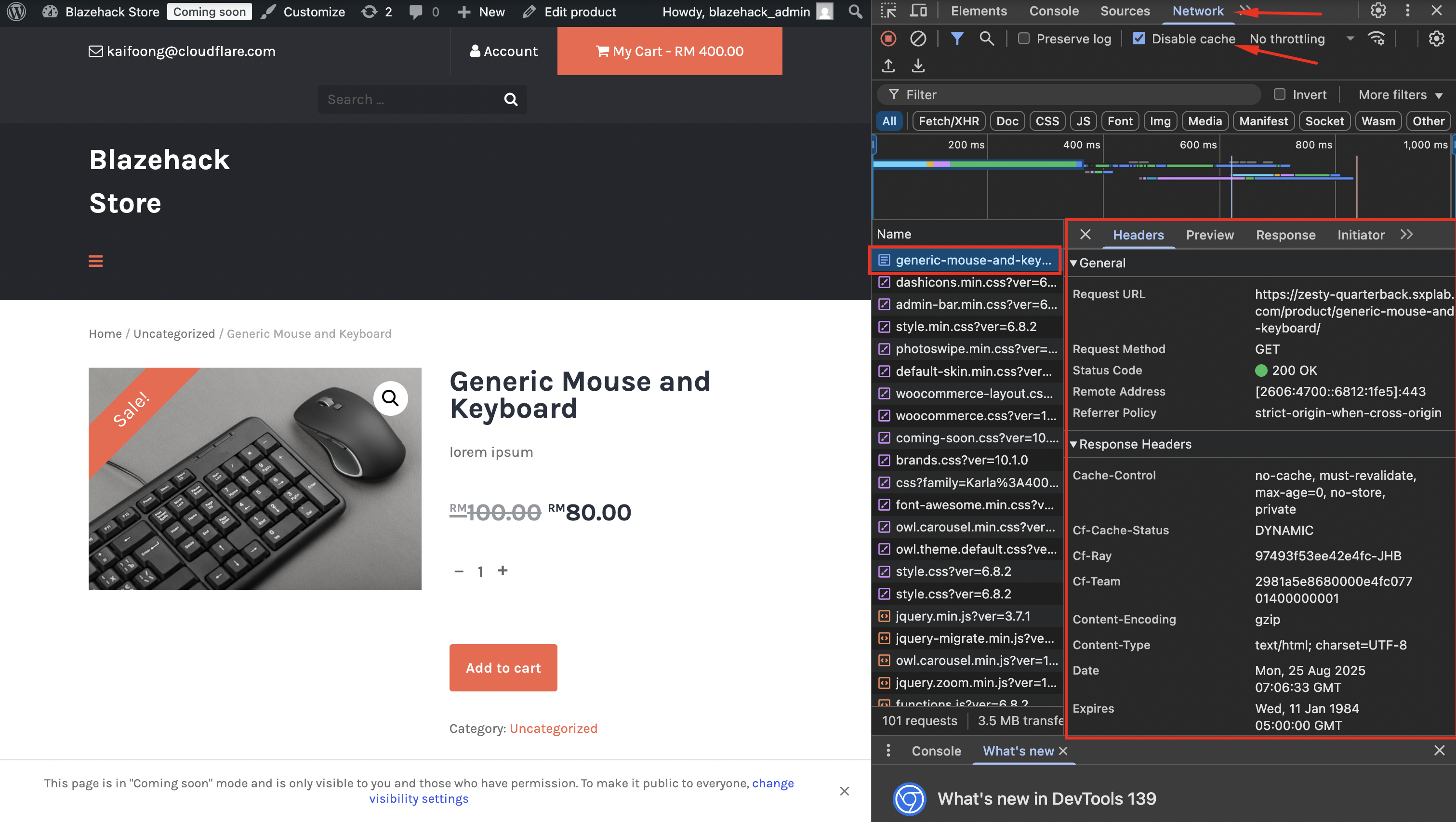
The main header that we’re interested in here is cf-cache-status - note how the value is DYNAMIC - this tells Cloudflare that this resource is not considered eligible for cache, and the page is therefore pulled directly from the origin. We will change this behavior in the next task, and analyze the results again.
2. Create a cache rule for /product/generic-mouse-and-keyboard/
We will now modify the default cache behavior to serve the html content of /product/generic-mouse-and-keyboard/ from cache.
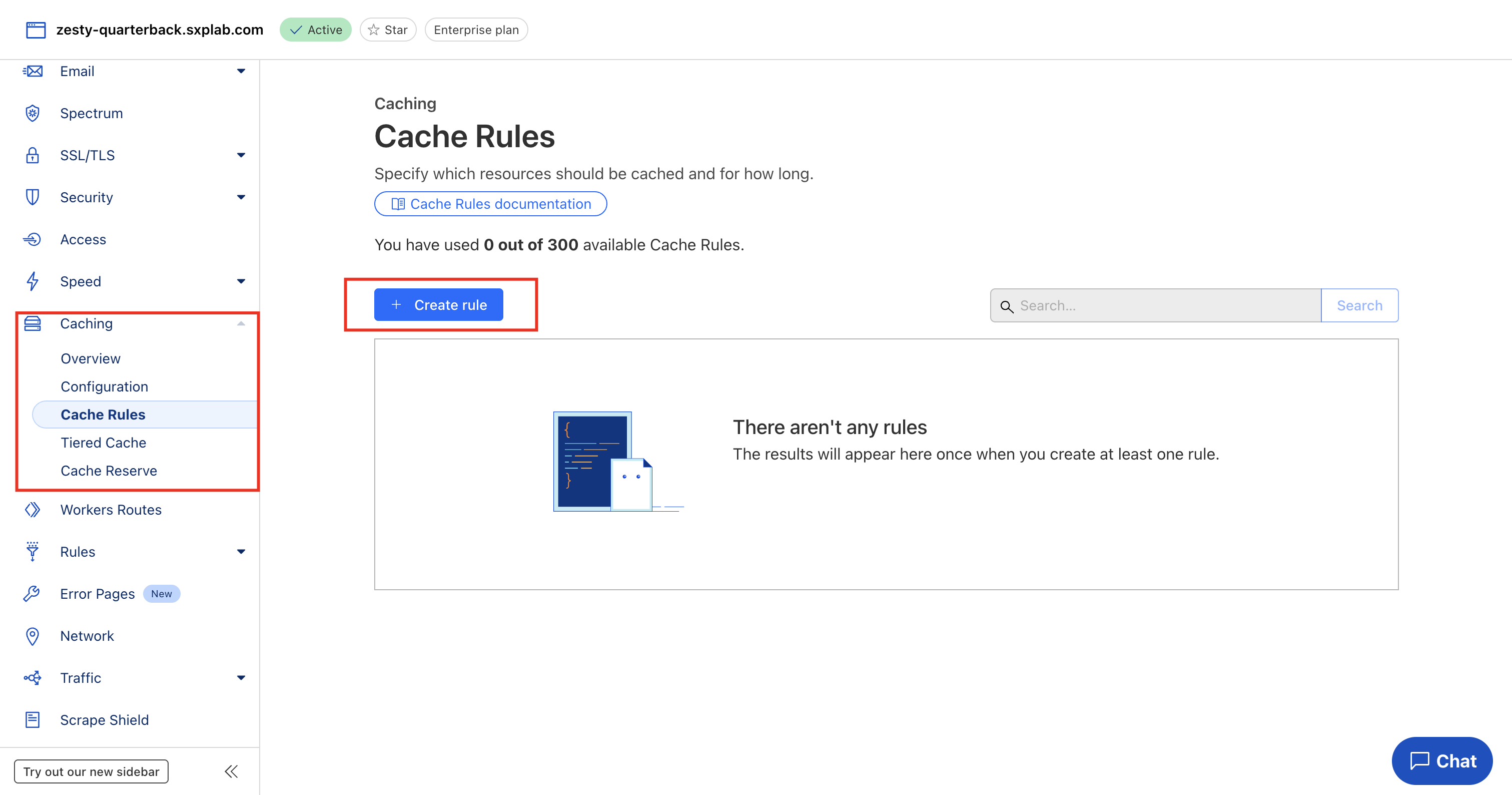
In the Cloudflare Dashboard go to Caching ‣ Cache Rules and select Create rule
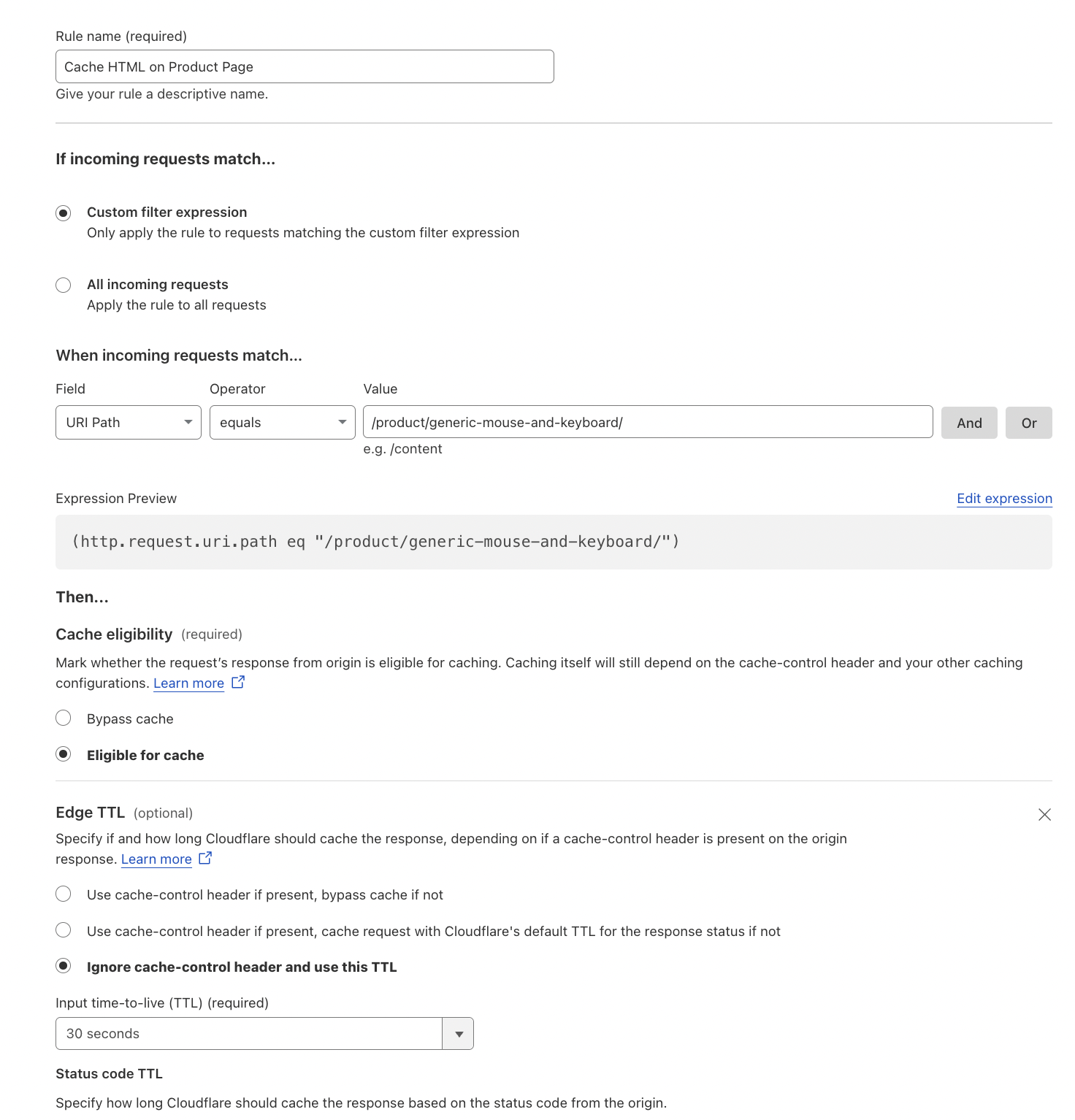
- Enter a descriptive name for the rule, such as “Cache HTML on Product Page”
- Set the Field to URI Path
- Set the Operator to equals
- Set the Value to /product/generic-mouse-and-keyboard/
- Set Cache status to Eligible for cache
- You can customize additional cache settings such as:
- Edge TTL: The time that Cloudflare caches the resource on the Cloudflare network.
- Browser TTL: The time that a visitor’s browser caches the resource.
- Cache Key: Customize what is included in the cache key.
- Serve Stale Content: Serve stale content while revalidating in the background.
- Respect Strong ETags: Respect strong ETags for cache revalidation.
- Origin Error Page Pass-thru: Pass through error pages from the origin.
- To the right of where you see Edge TTL, Click + Add Setting
- Choose Ignore cache-control header and use this TTL and set the duration to 30 seconds
You configuration should look like this:
- Scroll down, leaving the other values as default (but feel free to explore them!) and click Deploy
This will create a cache rule that makes all content on the /product/generic-mouse-and-keyboard/ page eligible for cache, and will ignore origin cache control headers. The content will be cached for 30 seconds on the Cloudflare edge.
3. Test cache rule
Now we will test the cache rule
- curl
- Browser
Using curl let’s check the HTTP response headers:
$ curl -I "https://<slug>.sxplab.com/product/generic-mouse-and-keyboard/"
Expected Output:
< HTTP/2 200
< date: Mon, 25 Aug 2025 07:25:55 GMT
< content-type: text/html; charset=UTF-8
< cf-ray: 97495bb648c9e4fc-JHB
< cache-control: public, max-age=14400
< last-modified: Mon, 25 Aug 2025 07:25:55 GMT
< cf-cache-status: MISS
< expires: Mon, 25 Aug 2025 11:25:55 GMT
< Secure; SameSite=None
< server: cloudflare
< server-timing: cfReqDur;dur=259.555
Using Developer Tools let’s check the HTTP response headers:
https://<slug>.sxplab.com/product/generic-mouse-and-keyboard/
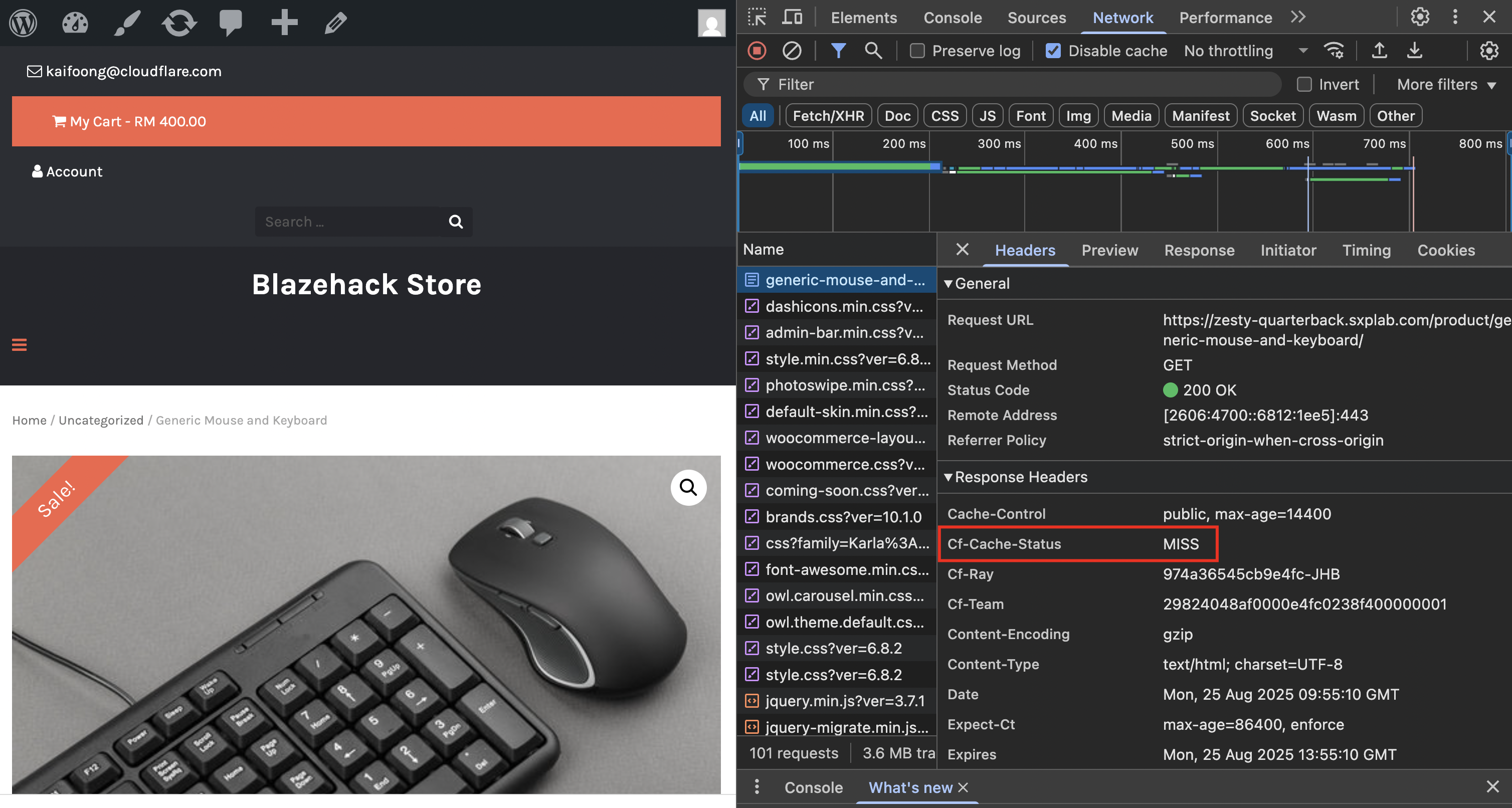
Note how you now see cf-cache-status with a value of MISS
MISS tells us that the resource is eligible for cache, but was not in cache and so came from the origin. Run the command immediately again:
- curl
- Browser
Run the command immediately again:
$ curl -I "https://<slug>.sxplab.com/product/generic-mouse-and-keyboard/"
Expected Output:
< HTTP/2 200
< date: Mon, 25 Aug 2025 07:29:37 GMT
< content-type: text/html; charset=UTF-8
< cf-ray: 974961228d4ce4fc-JHB
< cache-control: public, max-age=14400
< last-modified: Mon, 25 Aug 2025 07:29:36 GMT
< cf-cache-status: HIT
< age: 1
< expires: Mon, 25 Aug 2025 11:29:37 GMT
< server: cloudflare
< server-timing: cfReqDur;dur=16.019
Refresh the page immediately again:
https://<slug>.sxplab.com/product/generic-mouse-and-keyboard/
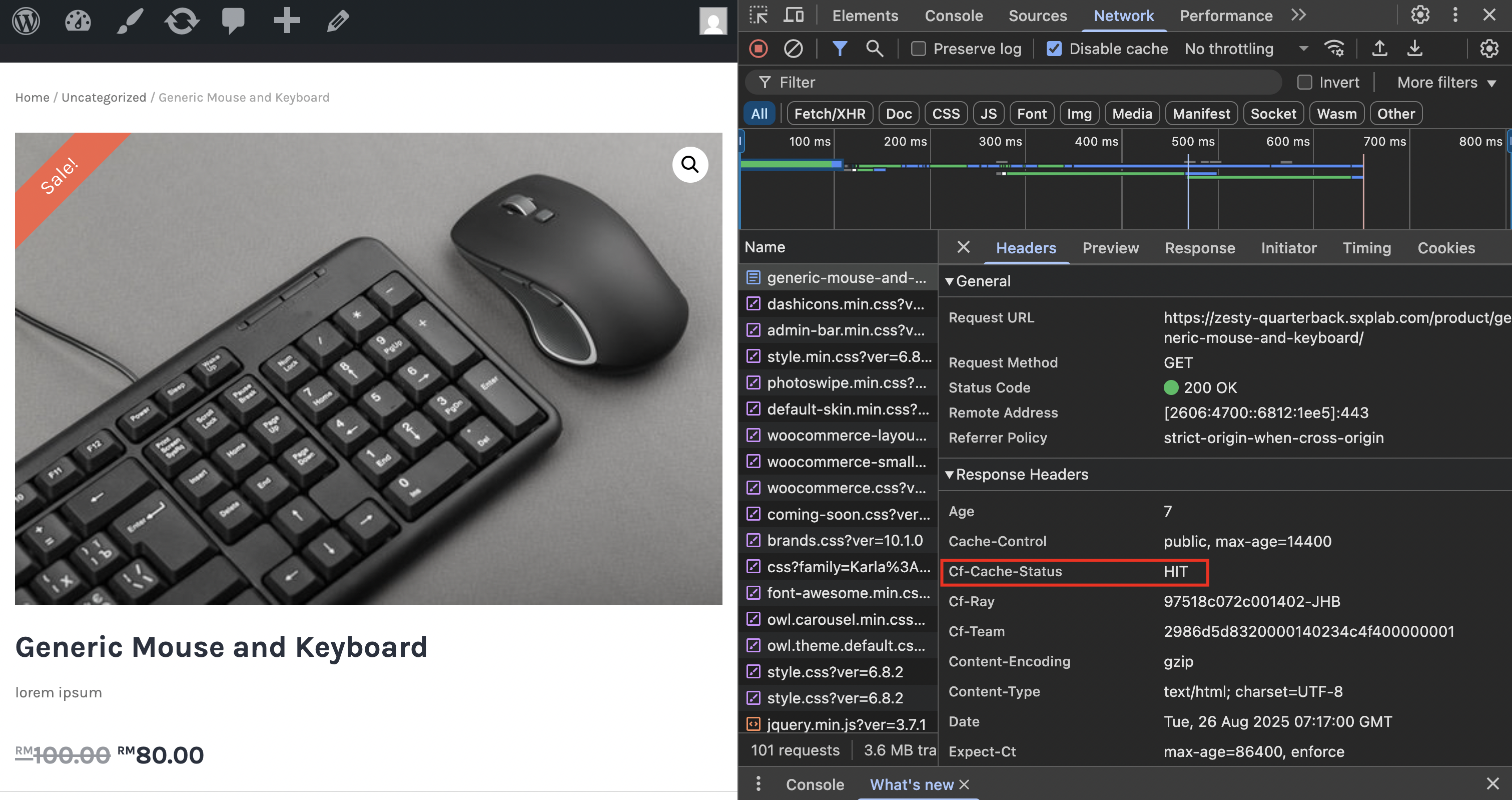
Success! We have a cf-cache-status of HIT - the page was served from cache.
Note the age header - we see it’s been in cache for X seconds in the below example. Make sure you have waited at least 30 seconds, and then try again:
- curl
- Browser
$ curl -I "https://<slug>.sxplab.com/product/generic-mouse-and-keyboard/"
Expected Output:
< HTTP/2 200
< date: Mon, 25 Aug 2025 07:43:25 GMT
< content-type: text/html; charset=UTF-8
< cf-ray: 97497557d94be4fc-JHB
< cache-control: public, max-age=14400
< last-modified: Monday, 25-Aug-2025 07:43:25 GMT
< cf-cache-status: EXPIRED
< expires: Mon, 25 Aug 2025 11:43:25 GMT
< server: cloudflare
< server-timing: cfReqDur;dur=152.308
https://<slug>.sxplab.com/product/generic-mouse-and-keyboard/
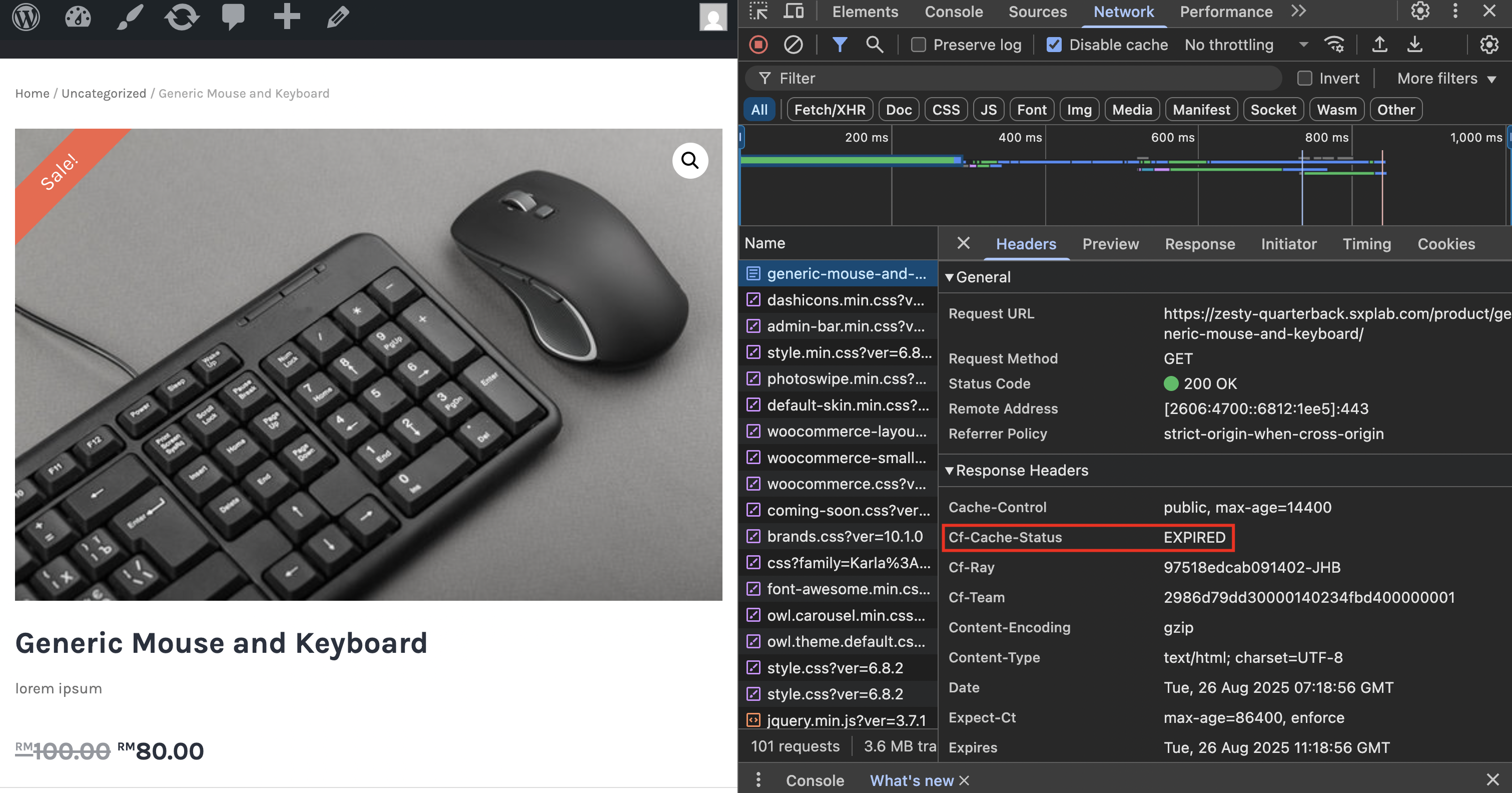
The content has now been EXPIRED.
If you try again, you’ll see another hit right away.
Try browsing to other pages, you will note that the cf-cache-status is still DYNAMIC elsewhere.
Go ahead and try it with https://<slug>.sxplab.com/product/generic-headset/
4. Expanding the Scope
When used appropriately, caching content has substantial performance benefits and offloads tasks from your origin servers. In the last example we created a rule to cache all content on /product/generic-mouse-and-keyboard/ - now let’s expand this to cover everything under /product/.
Modify the rule you already created, updating the match criteria as follows:
- Keep the Field set to URI Path
- Set the Operator to contains
- Set the Value to /product/
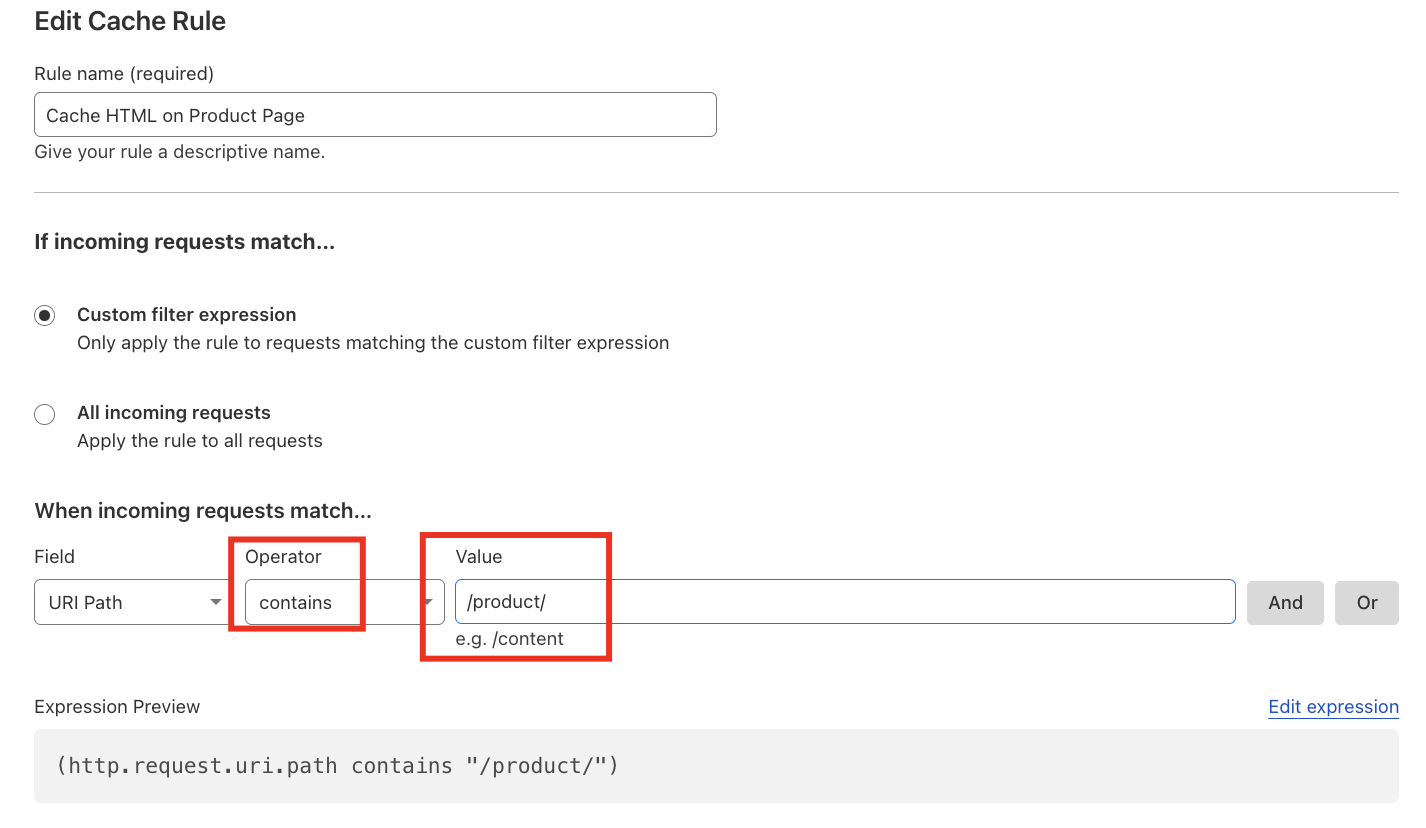
- Leave the other values as they already are and click Save
- curl
- Browser
Test by browsing to another page, eg /product/generic-headset/ - run curl at least twice; you will see a cache HIT.
(If it is still showing DYNAMIC, wait for a few minutes)
$ curl -I "https://<slug>.sxplab.com/product/generic-headset/"
< HTTP/2 200
< date: Mon, 25 Aug 2025 08:24:19 GMT
< content-type: text/html; charset=UTF-8
< cf-ray: 9749b143ff1ee4fc-JHB
< cache-control: public, max-age=14400
< last-modified: Monday, 25-Aug-2025 08:24:15 GMT
< cf-cache-status: HIT
< age: 4
< expires: Mon, 25 Aug 2025 12:24:19 GMT
< server: cloudflare
< server-timing: cfReqDur;dur=15.841
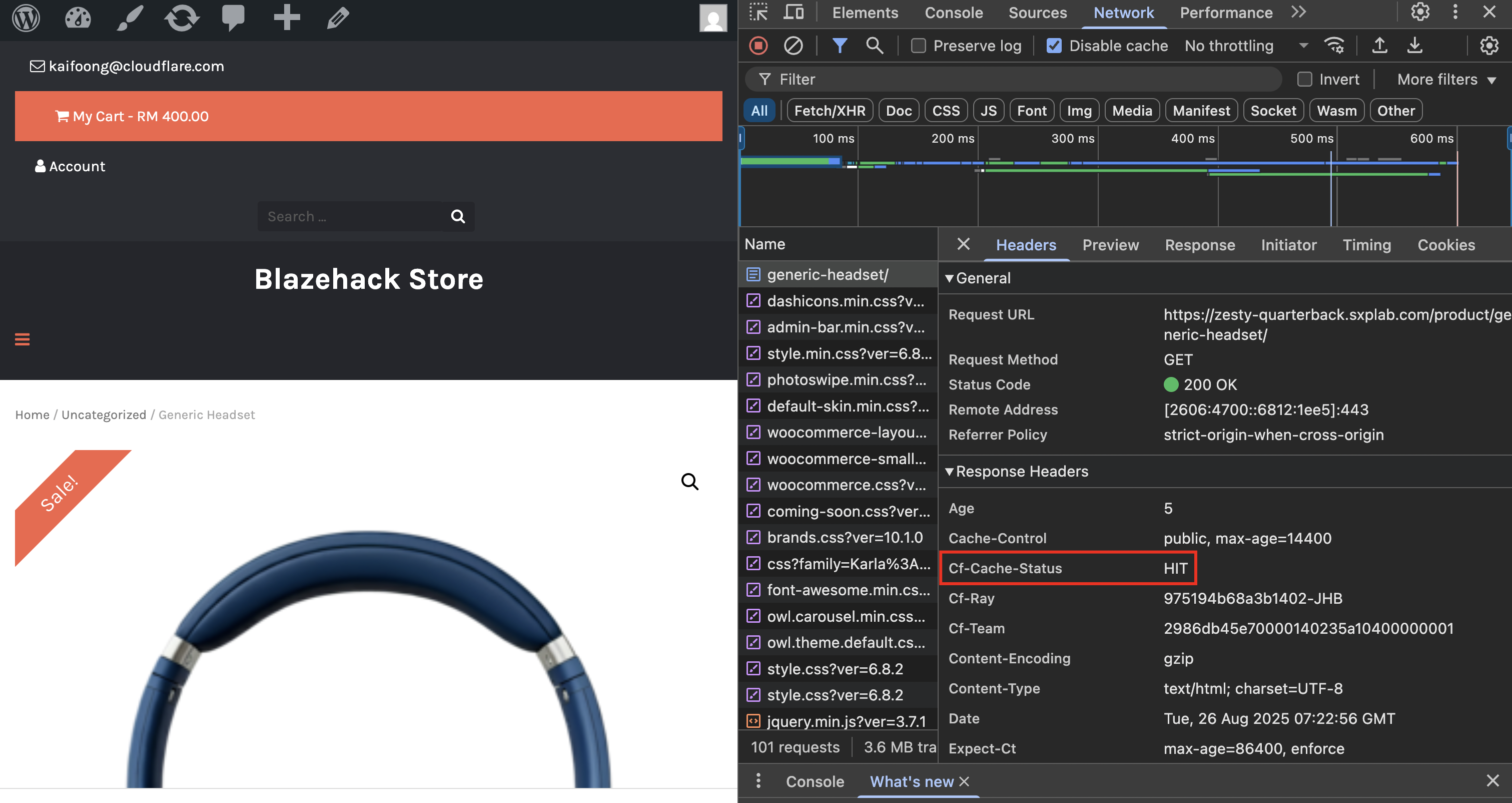
Test by browsing to another page, eg https://<slug>.sxplab.com/product/generic-headset/ - refresh the page at least once; you will see a cache HIT.
(If it is still showing DYNAMIC, wait for a few minutes)
So far we have been focussing on pages that exist and give an HTTP 200 response. But what happens if we try to navigate to a page that matches a cache rule, but does not exist?
Attempt to reach any made up page within /product/, for example:
- curl
- Browser
$ curl -I "https://<slug>.sxplab.com/product/doesnotexist/"
< HTTP/2 404
< date: Mon, 25 Aug 2025 08:27:32 GMT
< content-type: text/html; charset=UTF-8
< cf-ray: 9749b5f9ce07e4fc-JHB
< expires: Mon, 25 Aug 2025 12:27:32 GMT
< cache-control: public, max-age=14400
< cf-cache-status: MISS
< server: cloudflare
< server-timing: cfReqDur;dur=179.585
We have an HTTP 404 (File Not Found) response and a cf-cache-status of MISS
Re-run the command:
$ curl -I "https://<slug>.sxplab.com/product/doesnotexist/"
< HTTP/2 404
< date: Mon, 25 Aug 2025 08:29:36 GMT
< content-type: text/html; charset=UTF-8
< cf-ray: 9749b8fc3f4ae4fc-JHB
< expires: Mon, 25 Aug 2025 12:29:36 GMT
< cache-control: public, max-age=14400
< cf-cache-status: HIT
< age: 124
< server: cloudflare
< server-timing: cfReqDur;dur=23.341
Browse to https://<slug>.sxplab.com/product/doesnotexist/:
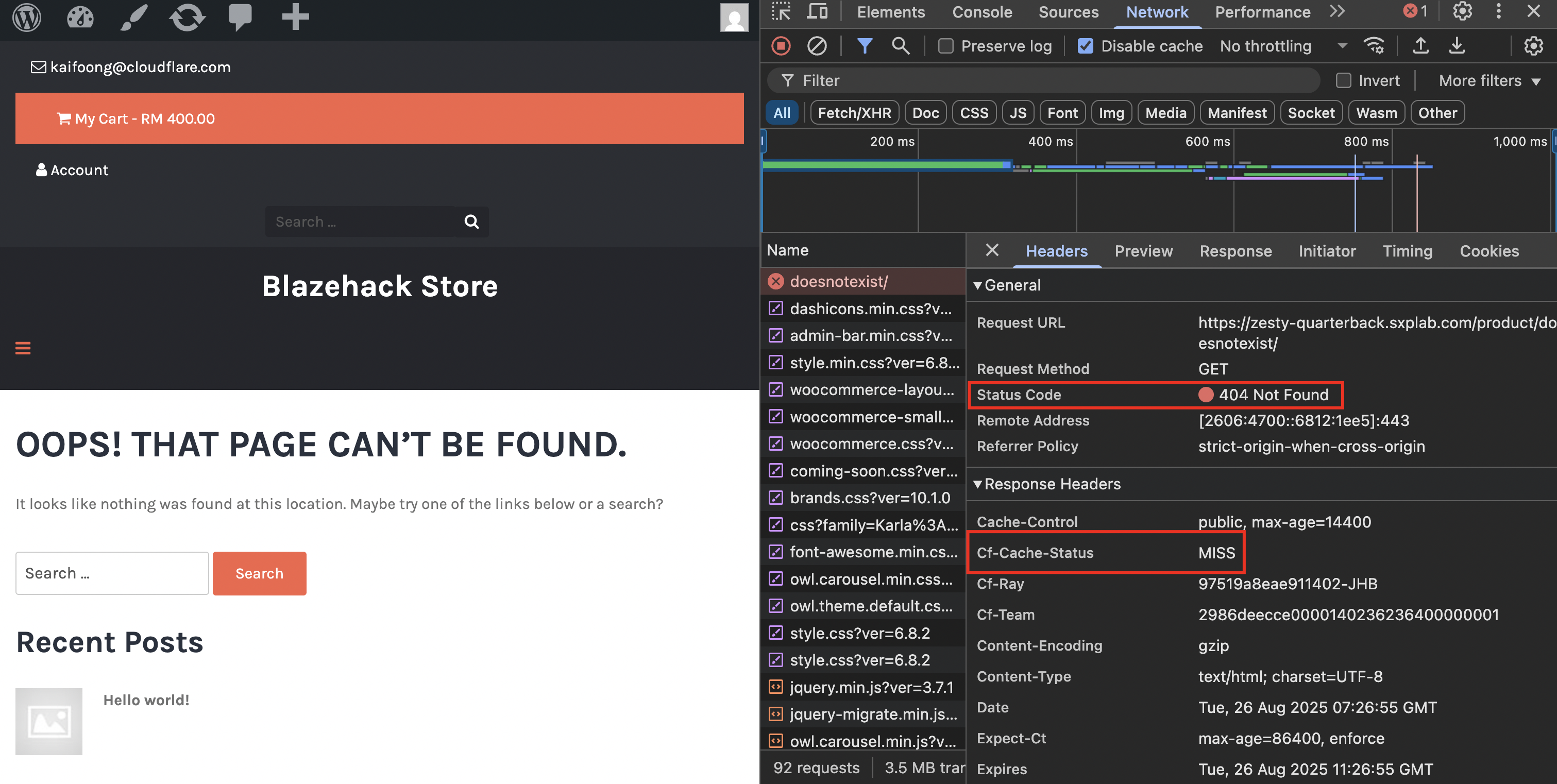
We have an HTTP 404 (File Not Found) response and a cf-cache-status of MISS
Refresh the page:
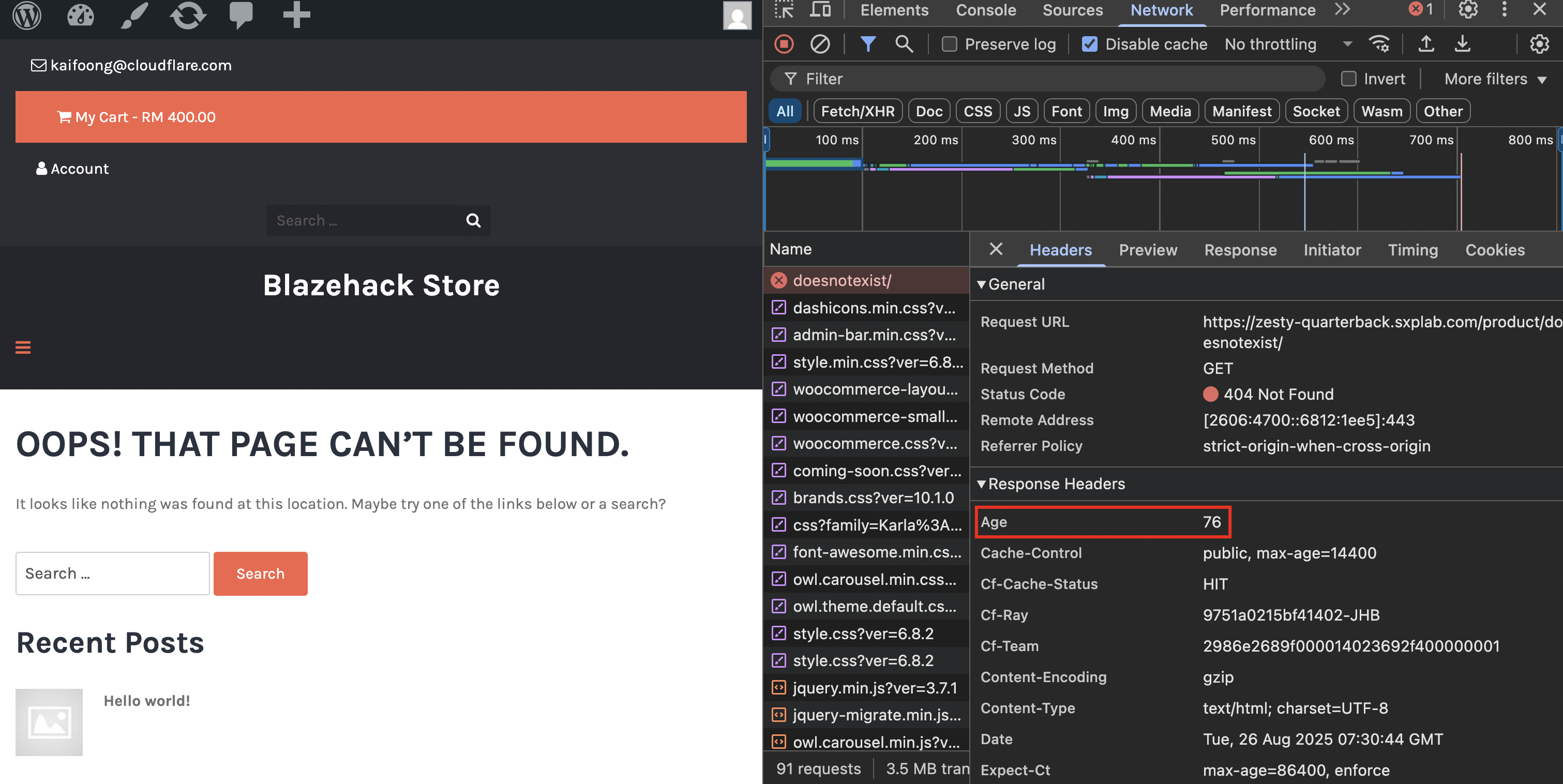
Study the output above for a moment, and replicate yourself, what do you notice that is strange?
- We have a cache
HITdespite being a 404 - The
ageheader is returning a value higher than our TTL - …why?
Cache by status code documentation shows us that the 404 error code has a default TTL of 3 minutes (or 180 seconds)
To fix this, we just need to modify our rule to override the default behavior for a 404 response code.
Before we continue, let's purge the cache, otherwise you may still keep receiving hits due to the previous tests. Navigate to Caching ‣ Configuration ‣ Purge Everything
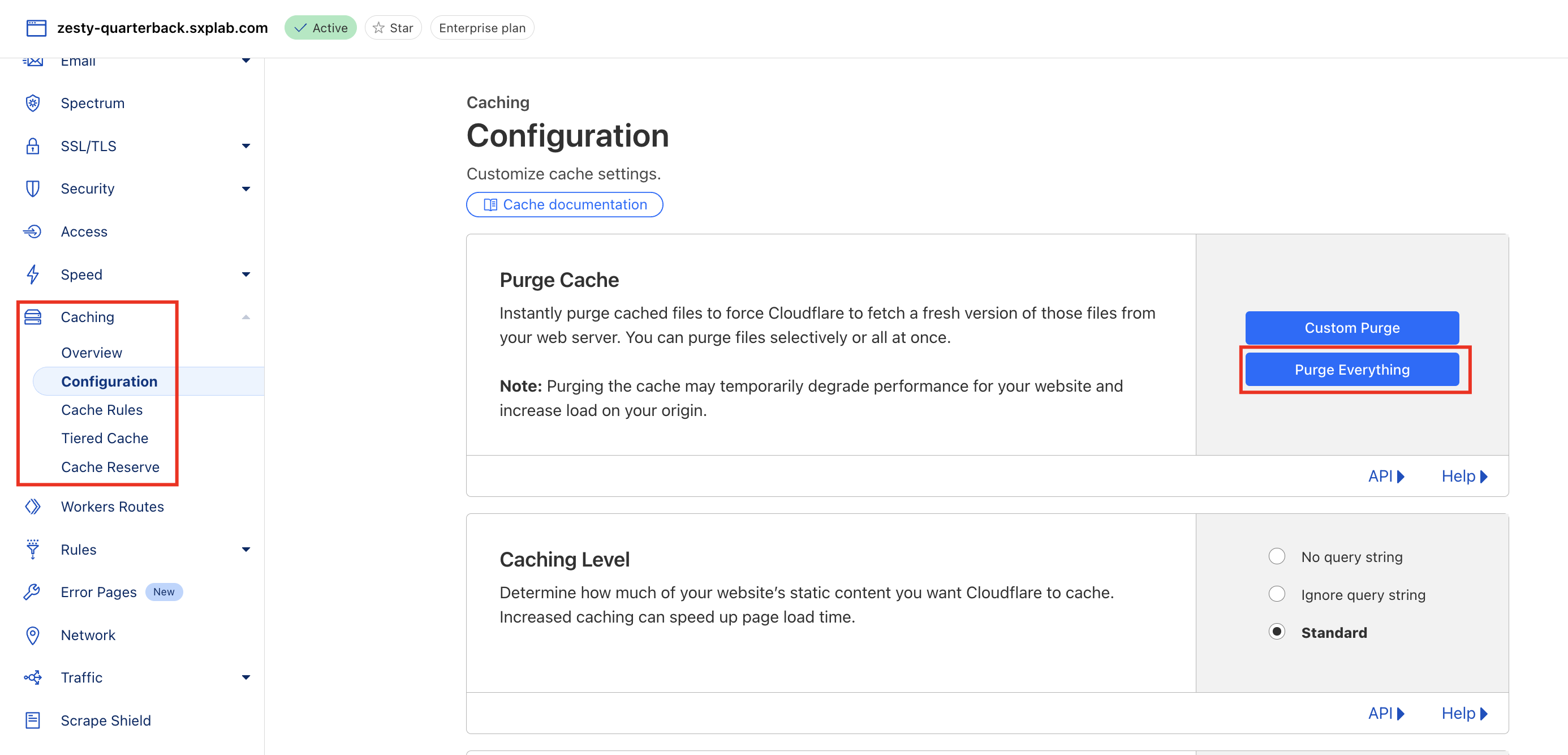
You are welcome to use Custom Purge as you like. If you are unsure what these are then take a look at the Cache Purge Dev Docs.
Head back to Cache Rules and modify your rule to set a Status code TTL:
- Within the Edge TTL section that we already configured, select Add status code setting
- Set the Scope to Single Code
- Set the Status code to 404
- Set Duration to 10 seconds
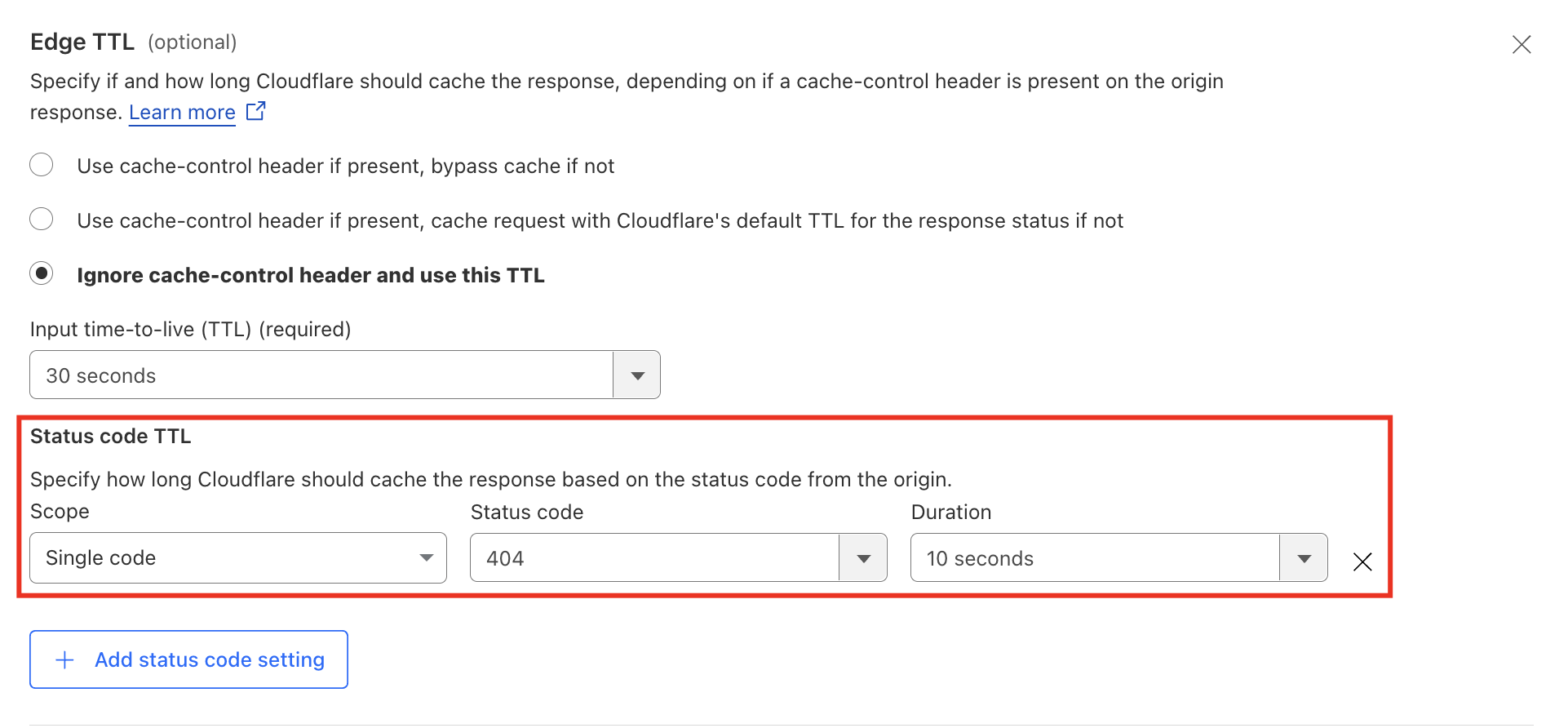
Make no other changes and save your rule again.
- curl
- Browser
Rerun the test:
$ curl -I "https://<slug>.sxplab.com/services/doesnotexist/"
< HTTP/2 404
< date: Mon, 25 Aug 2025 08:36:22 GMT
< content-type: text/html; charset=UTF-8
< cf-ray: 9749c2e74e96e4fc-JHB
< expires: Mon, 25 Aug 2025 12:36:22 GMT
< cache-control: public, max-age=14400
< cf-cache-status: HIT
< age: 9
< server: cloudflare
< server-timing: cfReqDur;dur=14.825
In this example I happened to catch the age at 9 seconds. When testing this, try running the command a few times. You will see that you get a status of EXPIRED after 10 seconds, and then HIT again:
$ curl -I "https://<slug>.sxplab.com/services/doesnotexist/"
< HTTP/2 404
< date: Mon, 25 Aug 2025 08:36:28 GMT
< content-type: text/html; charset=UTF-8
< cf-ray: 9749c30be932e4fc-JHB
< expires: Mon, 25 Aug 2025 12:36:28 GMT
< cache-control: public, max-age=14400
< cf-cache-status: EXPIRED
< server: cloudflare
< server-timing: cfReqDur;dur=145.828
rerun immediately
$ curl -I "https://<slug>.sxplab.com/services/doesnotexist/"
< HTTP/2 404
< date: Mon, 25 Aug 2025 08:36:29 GMT
< content-type: text/html; charset=UTF-8
< cf-ray: 9749c3129caae4fc-JHB
< expires: Mon, 25 Aug 2025 12:36:29 GMT
< cache-control: public, max-age=14400
< cf-cache-status: HIT
< age: 1
< server: cloudflare
< server-timing: cfReqDur;dur=13.514
https://<slug>.sxplab.com/services/doesnotexist/
Refresh the page again:
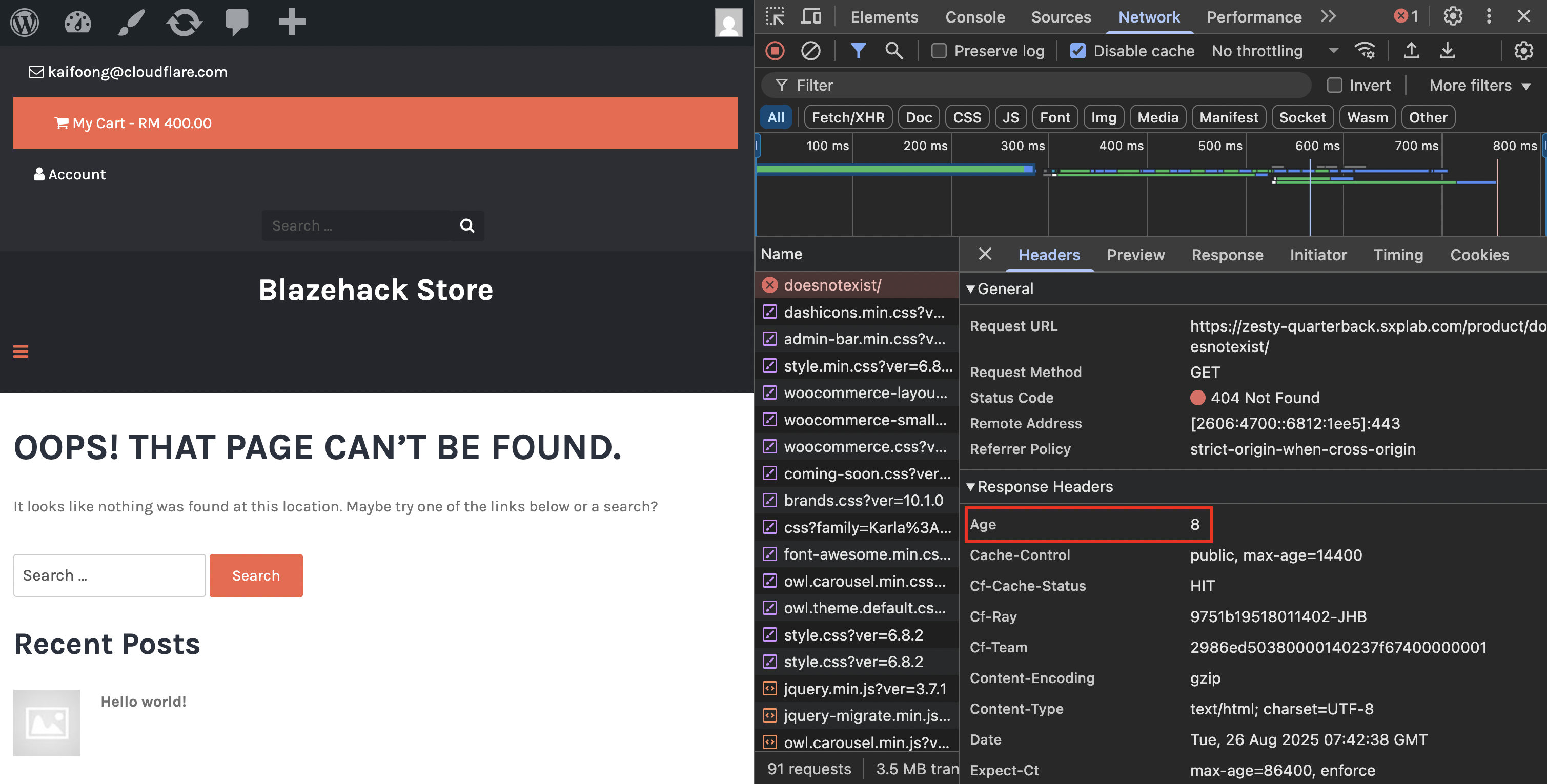
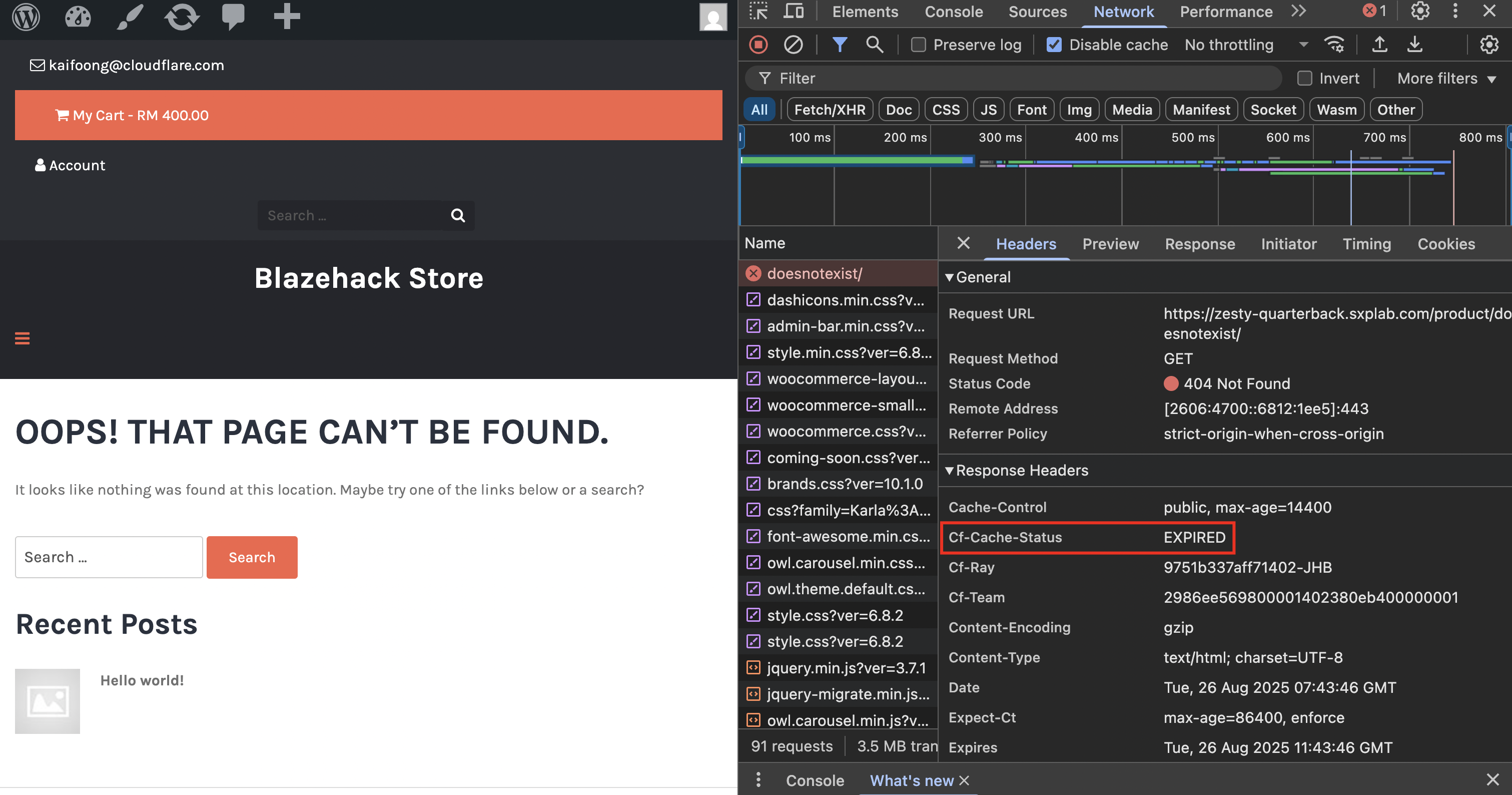
In this example I happened to catch the age at 8 seconds. When testing this, try running the command a few times. You will see that you get a status of EXPIRED after 10 seconds, and then HIT again:
Understanding how cache varies by status code is important, and the scenario of cached 404 pages is not uncommon!
Key Takeaway: Cache Rules give you granular control over your cache, allowing you to build a caching strategy that fits your application's specific needs.