Bot Management
Not all bots are bad — search engines, uptime monitors, and partner integrations are examples of good bots that you want to allow. But the majority of automated traffic on the internet comes from bad bots, which can harm your application by:
- Scraping content → copying data from your site without permission.
- Credential stuffing → reusing leaked usernames and passwords to break into accounts.
- Fake traffic & fraud → skewing analytics, generating ad fraud, or inflating load.
- Automated attacks → probing your site for vulnerabilities or exploiting APIs.
How Cloudflare Bot Management Works
Cloudflare uses a combination of machine learning, threat intelligence, and behavioral analysis to identify whether a request is from a human or a bot.
Each request receives a Bot Score:
- High score → likely human.
- Low score → likely bot.
You can then create rules to decide how to handle requests:
- Allow trusted bots.
- Challenge or block bad bots.
- Rate limit or log suspicious traffic for further analysis.
✅ With Bot Management, you protect your application and APIs from automated abuse while still allowing legitimate automation to function normally.
💡 Tip
Using Cloudflare Bot Management doesn’t mean all bots are bad.
Cloudflare automatically recognizes and allows verified bots (like Google, Bing, or monitoring services).
For unverified bot traffic, you decide whether it’s good or bad — for example, allowing trusted partner integrations but blocking content scrapers.
This gives you full flexibility to filter out harmful automation without breaking legitimate use cases.
Configure Rules for Bot
Bot Rules in Custom Rules
Bot-related rules are managed through Custom Rules.
-
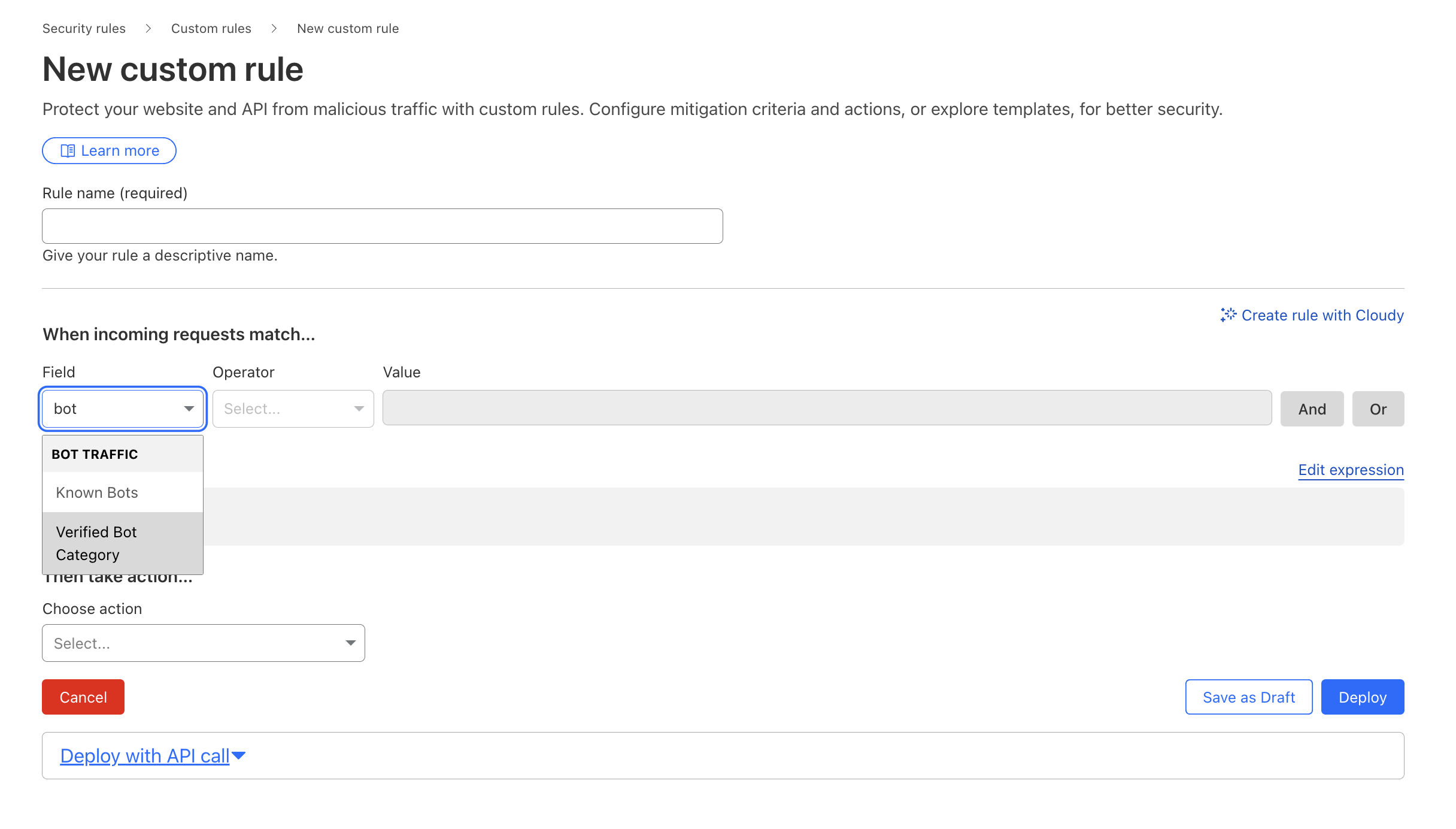
For accounts without Bot Management, the available fields are limited — searching for "bot" will only return a few options.
-
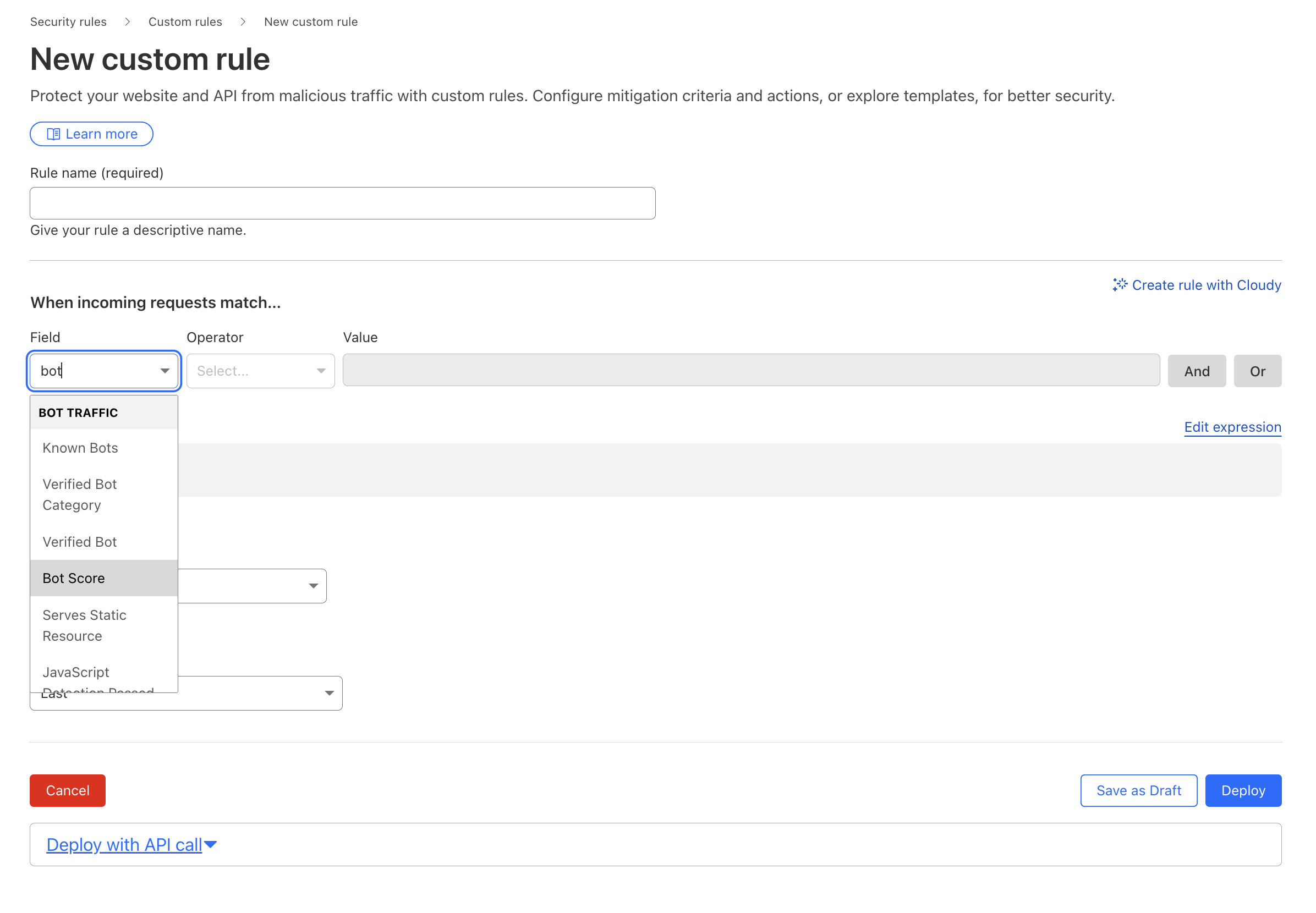
For accounts with Bot Management enabled, you’ll see many more bot-related fields and signals, giving you finer control over filtering, scoring, and handling bot traffic.
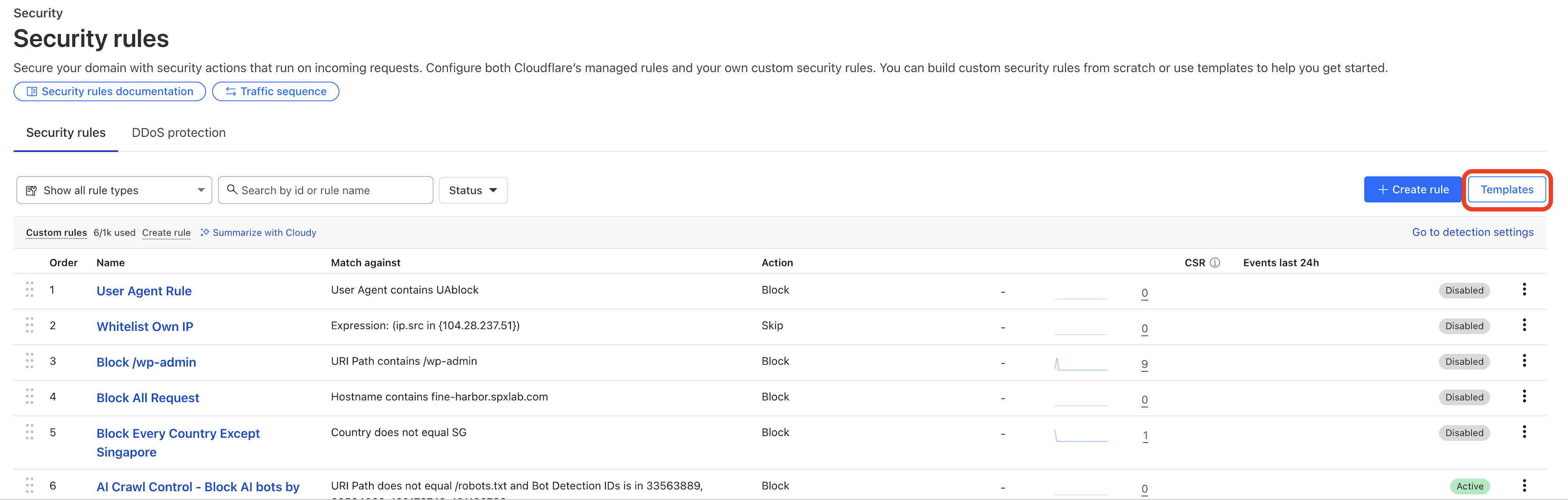
When creating Custom Security Rules, Cloudflare provides prebuilt templates you can use as a starting point.
-
In the Cloudflare Dashboard go to Security → Security rules → Templates
-
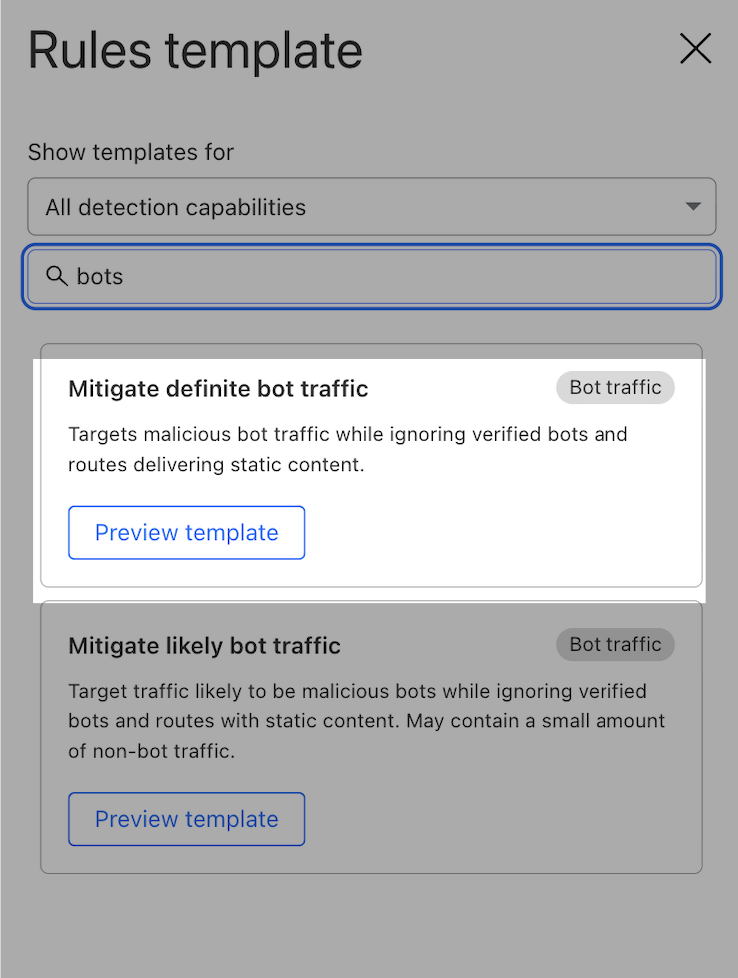
Under Rules template search for templates with "bots" and select
Mitigate definite bot traffictemplate by clickingPreview template.
Cloudflare’s Bot Management has evolved significantly in the last 1–2 years.
Previously, a raw curl request would almost always receive a low Bot Score (flagged as a bot) since it looked “non-browser.”
Now, Cloudflare’s ML models are trained on global internet traffic. Because curl is widely used for legitimate purposes (APIs, CI/CD pipelines, monitoring, health checks, etc.), it is no longer automatically classified as a “bad bot.”
Instead, Cloudflare evaluates a richer set of signals, including:
- JA3 / JA4 fingerprints (TLS/HTTP characteristics).
- TLS handshake patterns and connection details.
- Protocol usage (HTTP/2, HTTP/3 adoption).
- Request headers and behavior over time.
✅ This means if your curl traffic looks similar to safe, legitimate automation, it can receive a high Bot Score (90–99) — classified as likely human/verified automation.
- To avoid impacting other resources, limit it to a non-existing path
/hellobots
- At the URI Path
- Set the Operator to
contains - Set the Value to
/hellobots - Set the Action to
Blockwith default values - Deploy the rule
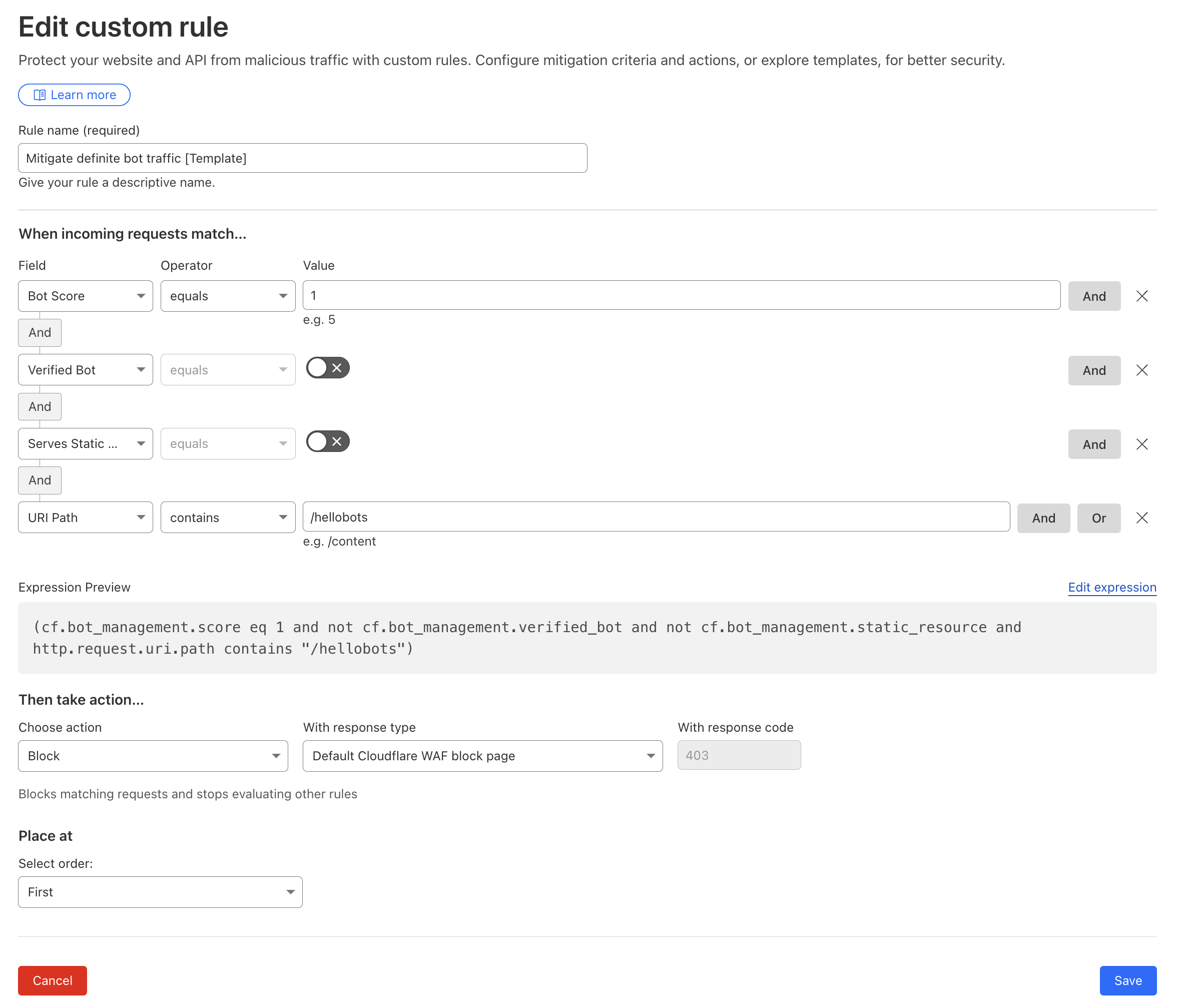
- In the Cloudflare Dashboard go to Security ‣ Analytics and take a look at the requests which triggered the block.
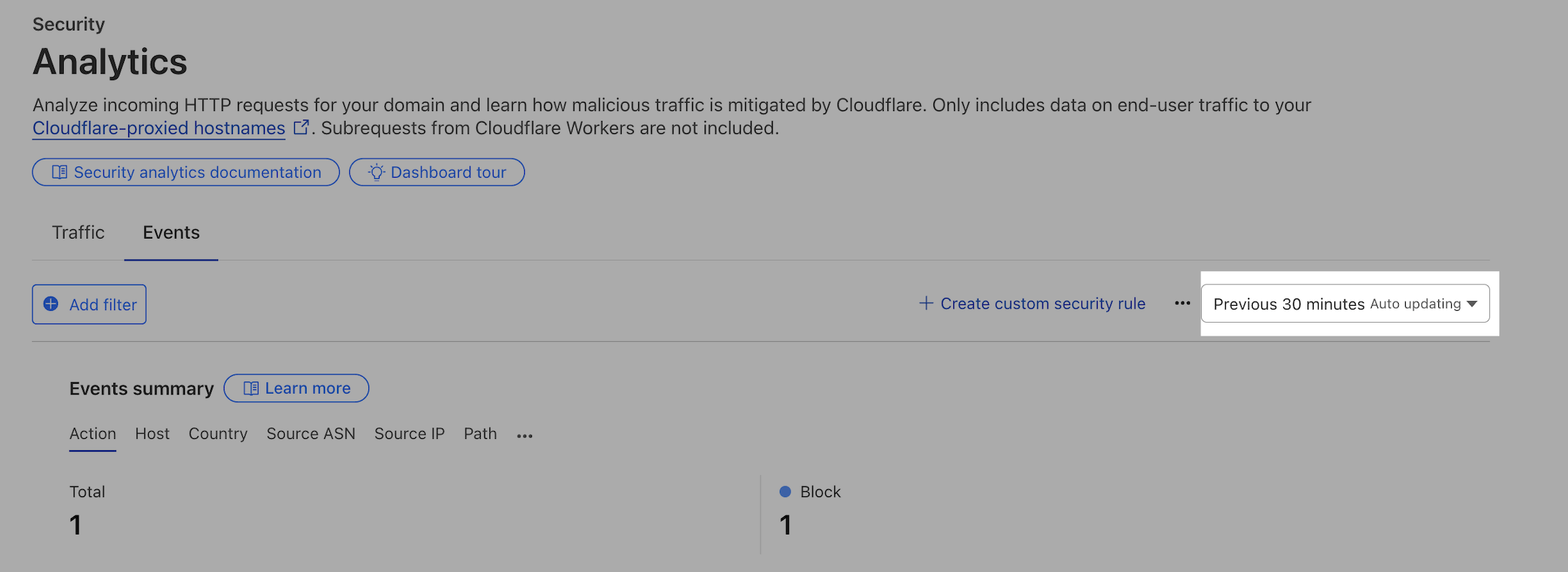
Can you see which rule triggered the block?
For the test case, we will do a quick request through requesting the URL for you
If you don't see the events immediately, or if you just want to see a smaller time period, try switching to 'Previous 30 minutes'
Cloudflare’s Bot Score is a dynamic signal (1 = very likely bot, 99 = very likely human) that helps you decide how to handle suspicious traffic.
Instead of hardcoding IPs or User Agents, you can rely on Bot Score to adapt automatically as new bot behaviors are detected — reducing the risk of missed attacks or false positives.
To make things easier, Cloudflare also provides a list of suggested bot rules you can use as templates — such as challenging requests with a low Bot Score, blocking empty or suspicious User Agents, or applying stricter actions on sensitive paths.
👉 Explore them here: Suggested Bot Rules to learn practical examples and see how to build on top of Cloudflare’s detection.
🔑 Key Takeaways: Bot Management
- Not all bots are bad — search engines and monitoring services are good bots you want to keep, while scrapers and attackers are harmful.
- Cloudflare assigns a Bot Score (1 = very likely bot, 99 = very likely human) to each request, helping you decide whether to allow, challenge, block, or log.
- Instead of relying only on IPs or User Agents, Bot Score adapts dynamically based on ML, fingerprints (JA3/JA4), TLS patterns, and behavioral signals — reducing false positives and catching new attack methods.
- You can start quickly with Cloudflare’s Suggested Bot Rules or use the security rule templates in the dashboard.
- Bot Score thresholds should be tuned to your application:
- If your domain heavily relies on APIs or scripts, avoid setting the block threshold too high.
- Learn more about Bot Score interpretation.
- For API security, it’s best practice to skip bot scoring on API endpoints and instead protect them with API Shield (mTLS, schema validation, JWTs).
- For mobile app protection, Cloudflare integrates with Approov via their SDK, enabling strong API request validation and preventing unauthorized traffic.
✅ With Bot Management, you strike the right balance: block bad automation, allow good automation, and protect APIs/mobile apps with specialized tools.